

Running Zeko's Data Availability Layer
A critical component of any rollup system is the data availability layer. This layer is responsible for storing all the transaction data that occurs on the rollup.
In this guide we will create a da-layer that will receive transaction data from L2 Zeko rollup. Additionally we will add zeko-archive stack to be able to query it.
Note: To have a functioning da-layer you only need
da-layerservice. The rest of the components are for querying the data.
You will need the following Zeko components:
DA LayerZeko Archive relayMina ArchivePostgresql database
Not covered in this guide:
- installing
mina-node-apito view transactions - Exposing da-layer/archive to the internet
We will use docker compose to define the whole stack in a single file.
TL;DR skip to the Bootstrap process
Prerequisites
System Requirements
- Linux or macOS (Windows WSL2 works too)
- 1 CPU core, 2GB RAM
Note: Running da-layer node does not need much ram. However to sync the full history without using snapshots and database backups, more RAM will allow quicker initial sync.
Installed Software
Docker
Overview
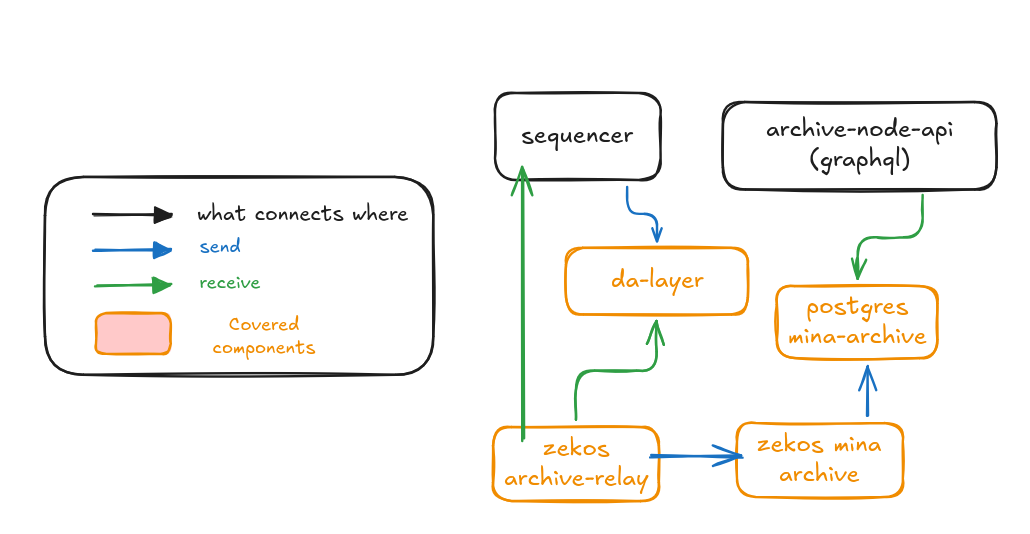
In the diagram above you see:
- Zeko's sequencer sending transactions to
da-layer archive-relaypulls data from Zeko's sequencer andda-layerand sends it tomina-archivemina-archiveis inserting transactions topostgresqlarchive-node-apiprovides graphql endpoint to query da-layer data.
Project Structure
Layout of the project directory:
project-root/
└── docker-compose.yaml
Note:
docker-compose.yamlis using docker volumes to store data. If you prefer to mount local directories instead - change accordingly.
Wallets
To run a da-layer you will need:
da-layer- Eachda-layernode is started with its wallet.
Volumes/files
| Volumes | Files | Purpose |
|---|---|---|
keys_data | da-node-sk | Private key of the DA node |
keys_data | da-node-pk | Public key of the DA node (used by sequencer) |
initdb_data | Schema file(s) to bootstrap postgresql | |
postgresql_data | Persistent storage for postgresql | |
da-layer_data | Persistent storage for da-layer |
Service Overview
postgresqlda-layerarchive-relaymina-archive
Ports Exposed
| Service | Port | Description |
|---|---|---|
| da-layer | 1924 | da-layer rpc API |
| postgres | 5432 | Database |
Bootstrap process
Getting/Creating configuration files
Copy
docker-compose.yamlto your project folder.Click to expand
docker-compose.yamlyamlservices: init-db: image: docker.io/zekolabs/zeko:latest container_name: init-db volumes: - initdb_data:/data/initdb entrypoint: - sh - -c command: > "curl -o /data/initdb/create_schema.sql 'https://raw.githubusercontent.com/zeko-labs/zeko/compatible/src/app/archive/create_schema.sql' && echo 'ALTER DATABASE archive OWNER TO archive;' > /data/initdb/init.sql && echo 'Archive database bootstrap complete' && exit 0" init-config: image: docker.io/zekolabs/zeko:latest container_name: init-config working_dir: /data volumes: - keys_data:/data/keys entrypoint: - sh - -c restart: "no" command: > "while [ ! -f /data/keys/.keys_created ]; do sleep 2; done; exit 0" postgres: depends_on: init-db: condition: service_completed_successfully image: postgres:16 container_name: postgres environment: POSTGRES_DB: archive POSTGRES_USER: archive POSTGRES_PASSWORD: archive volumes: - postgresql_data:/var/lib/postgresql/data - initdb_data:/docker-entrypoint-initdb.d ports: - "5432:5432" restart: unless-stopped da-layer: depends_on: init-config: condition: service_completed_successfully image: docker.io/zekolabs/zeko-da:latest container_name: da-layer ports: - "1924:1924" environment: ZEKO_SIGNATURE_KIND: "testnet" entrypoint: bash -c command: | "export MINA_PRIVATE_KEY=$(cat /keys/da-layer-sk) && \\ exec zeko-da \\ run-node \\ --port 1924 \\ --db-dir /data/db \\ --network-id testnet" volumes: - da-layer_data:/data - keys_data:/keys:ro restart: always archive: depends_on: postgres: condition: service_started image: zekolabs/zeko-archive-relay:latest container_name: archive entrypoint: bash -c command: | "exec zeko-archive run \\ --postgres-uri postgres://archive:archive@postgres:5432/archive" restart: always volumes: - archive_data:/data archive-relay: depends_on: archive: condition: service_started da-layer: condition: service_started image: zekolabs/zeko-archive-relay:latest container_name: archive-relay entrypoint: bash -c command: | "exec zeko-archive-relay \\ --zeko-uri \"https://testnet.zeko.io/graphql\" \\ --da-node da-layer:1924 \\ --network-id testnet \\ --db-dir /data \\ --sync-period 30 \\ --log-level Info \\ --archive-host archive \\ --archive-port 3086" volumes: - archive-relay_data:/data restart: always volumes: initdb_data: postgresql_data: da-layer_data: keys_data: archive_data: archive-relay_data:Start all services
bashdocker compose up -dCreate
da-layerkeys- Enter
init-configcontainer:
bashdocker compose exec -it init-config bashNote: This image contains
zeko-clibinary.- Create
da-layerkeypair
/data/keys/da-layer-pk/data/keys/da-layer-sk
Note: Take note of
da-layer-pkbash# create `da-layer` keypair zeko-cli generate-even-key | while read label1 label2 value; do if [ "$label1" = "Private" ]; then echo "$value" > da-layer-sk elif [ "$label1" = "Public" ]; then echo "$value" > da-layer-pk fi done mv da-layer-{sk,pk} /data/keys touch /data/keys/.keys_created- Enter
If all the steps were performed correctly you have the following:
da-layergetting data from Zeko's L2archive-relaypulling data from da-layer and sending toarchivearchivestoring transactions inpostgresqlpostgres
Let Zeko know about your DA Layer
In order for you to start receiving transactions from Zeko L2 sequencer you need to:
- Expose your da-layer on the internet
- Contact Zeko and ask to be added to DA node list. You will need to provide:
- your
da-layerpublic key - address:port on which Zeko's sequencer can reach your
da-layer
- your
Synchronizing the data
Synchronizing will take a long time. At the time of writing Zeko L2 testnet has 1 million transactions and would take at least a week to get it synced. Alternatively you can reach out to Zeko for latest database/checkpoints archive that you can import in your setup and have a fully synced da-layer+archive in no time.
Access your data
You can access the data by running archive-node-api graphql server. Configure it to connect to your archive postgresql database.