

Legacy: Launch a Mina-backed Rollup
Legacy deployment guide
This runbook deploys the older Mina-backed Zeko stack. Its Mina node, zkApp, wallet, network, and fee instructions do not deploy the Ethereum rollup. Start with Ethereum Operator Getting Started for the current deployment path.
In this guide we will create a betternet - an L2 Zeko Rollup for Mina Devnet.
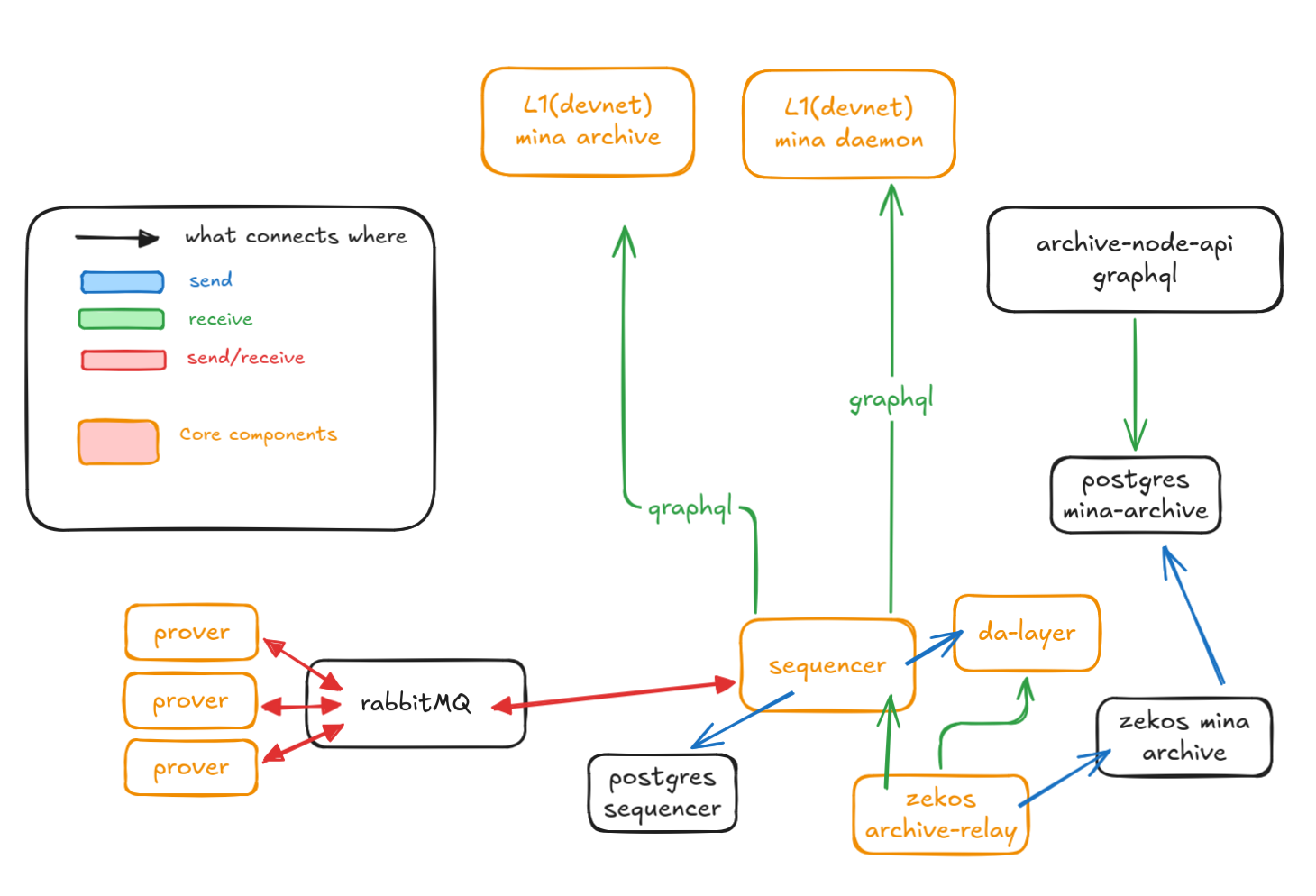
At a minimum, you need to run the following Zeko components:
SequencerSequencer signerDA LayerDA Layer signerProver
We will use docker compose to define the whole stack in a single file.
TL;DR skip to the Bootstrap process
Prerequisites
System Requirements
- Linux or macOS (Windows WSL2 works too)
- At least 4 CPU cores, 24GB RAM
Installed Software
Docker
Overview
We are going to:
- Create a
sequencerwallet and make sure it has funds. - Create a
faucetwallet. - Create a
deployment/circuitsconfig - Deploy a created configuration
- Start a
betternetL2 stack
Wallets
Deploying a rollup the following wallets are mentioned:
sequencer- A wallet to commit to zkApp. Has to be evenfaucet- A wallet that holds the funds. Cannot reuse sequencer's walletda-layer- Eachda-layernode is started with its wallet.fee-payer- A wallet that pays fees on commits. (We will usesequencer)pause- A wallet authorised to pause rollup. Has to be even (We will usesequencer).
Project Structure
Layout of the project directory:
project-root/
└── docker-compose.yaml
Note:
docker-compose.yamlis using docker volumes to store data. If you prefer to mount local directories instead - change accordingly.
Volumes/files
| Volumes | Files | Purpose |
|---|---|---|
keys_data | sequencer-sk | L1 private key to post proofs and pay fees |
keys_data | sequencer-pk | L1 Public key used in deploy step |
keys_data | faucet-sk | Secret key used to distribute tokens inside L2 |
keys_data | faucet-pk | Public key |
keys_data | da-layer-sk | Private key of the DA node |
keys_data | da-layer-pk | Public key of the DA node (used by sequencer) |
keys_data | da-signer/signer-auth-token | Auth token shared by DA layer and signer |
keys_data | da-signer/signer-tls.crt | TLS certificate for DA layer signer |
keys_data | da-signer/signer-tls.key | TLS private key for DA layer signer |
keys_data | sequencer-signer/signer-auth-token | Auth token shared by sequencer and signer |
keys_data | sequencer-signer/signer-tls.crt | TLS certificate for sequencer signer |
keys_data | sequencer-signer/signer-tls.key | TLS private key for sequencer signer |
initdb_data | Schema file(s) to bootstrap postgresql | |
postgresql_data | Persistent storage for postgresql | |
rabbitmq_data | Persistent storage for RabbitMQ | |
circuits_data | betternet-config.json | Circuits config used by sequencer/prover |
da-layer_data | Persistent storage for da-layer | |
sequencer_data | Persistent storage for sequencer |
Note: Keys must NOT have newlines or extra spaces.
Service Overview
postgresql- Used by sequencer.rabbitmq- Messaging layer used between the sequencer and the prover(s).da-signer- DA signer service that holdsda-layerkey.da-layer- Data Availability layer for thebetternet.prover- Generates zk-proofs for work submitted by the sequencer.sequencer-signer- Sequencer signer service that holdssequencerkey.sequencer- Runs the rollup logic, batches transactions, interacts with DA layer, and posts proofs to L1.
Ports Exposed
| Service | Port | Description |
|---|---|---|
| sequencer-signer | 9000 | Sequencer signer service |
| sequencer | 1923 | sequencer Graphql API |
| da-signer | 9001 | da-layer signer service |
| da-layer | 1924 | da-layer rpc API |
| postgres | 5432 | Database |
| rabbitmq | 5672 | Messaging queue |
Bootstrap process
Getting/Creating configuration files
Copy
docker-compose.yamlto your project folder.Click to expand
docker-compose.yamlyamlservices: init-db: image: docker.io/zekolabs/zeko:latest container_name: init-db volumes: - initdb_data:/data/initdb - circuits_data:/data/circuits entrypoint: - sh - -c command: > "echo 'ALTER DATABASE sequencer OWNER TO sequencer;' > /data/initdb/init.sql && echo 'Bootstrap complete' && exit 0" init-config: image: docker.io/zekolabs/zeko:latest container_name: init-config working_dir: /data volumes: - circuits_data:/data/circuits - keys_data:/data/keys entrypoint: - sh - -c restart: "no" command: > "while [ ! -f /data/keys/.keys_created ]; do sleep 2; done; exit 0" init-deploy: image: docker.io/zekolabs/zeko:latest container_name: init-deploy depends_on: init-config: condition: service_completed_successfully da-layer: condition: service_started working_dir: /data volumes: - circuits_data:/data/circuits - keys_data:/data/keys entrypoint: - bash - -c restart: "no" command: > "while [ ! -f /data/circuits/.deployed ]; do sleep 2; done; exit 0" postgres: depends_on: init-db: condition: service_completed_successfully image: postgres:16 container_name: postgres environment: POSTGRES_DB: sequencer POSTGRES_USER: sequencer POSTGRES_PASSWORD: sequencer volumes: - postgresql_data:/var/lib/postgresql/data - initdb_data:/docker-entrypoint-initdb.d ports: - "5432:5432" restart: unless-stopped rabbitmq: image: rabbitmq:latest container_name: rabbitmq volumes: - rabbitmq_data:/var/lib/rabbitmq ports: - "5672:5672" restart: unless-stopped sequencer-signer: depends_on: init-config: condition: service_completed_successfully image: docker.io/zekolabs/zeko:latest container_name: sequencer-signer ports: - "9000:9000" entrypoint: bash -c command: | "export MINA_PRIVATE_KEY=$(cat /keys/sequencer-sk) && \\ export ZEKO_SIGNER_AUTH_TOKEN=$(cat /keys/sequencer-signer/signer-auth-token) && \\ exec zeko-signer \\ run \\ --host 0.0.0.0 \\ --port 9000 \\ --allow-zkapp-signing \\ --max-fee 1 \\ --max-balance-change 0 \\ --tls-cert-file /keys/sequencer-signer/signer-tls.crt \\ --tls-key-file /keys/sequencer-signer/signer-tls.key" volumes: - keys_data:/keys:ro restart: always da-signer: depends_on: init-config: condition: service_completed_successfully image: docker.io/zekolabs/zeko-da:latest container_name: da-signer ports: - "9001:9001" entrypoint: bash -c command: | "export MINA_PRIVATE_KEY=$(cat /keys/da-layer-sk) && \\ export ZEKO_SIGNER_AUTH_TOKEN=$(cat /keys/da-signer/signer-auth-token) && \\ exec zeko-signer \\ run \\ --host 0.0.0.0 \\ --port 9001 \\ --allow-field-signing \\ --tls-cert-file /keys/da-signer/signer-tls.crt \\ --tls-key-file /keys/da-signer/signer-tls.key" volumes: - keys_data:/keys:ro restart: always da-layer: depends_on: da-signer: condition: service_started image: docker.io/zekolabs/zeko-da:latest container_name: da-layer ports: - "1924:1924" environment: ZEKO_SIGNATURE_KIND: "testnet" entrypoint: bash -c command: | "export ZEKO_SIGNER_AUTH_TOKEN=$(cat /keys/da-signer/signer-auth-token) && \\ export ZEKO_SIGNER_TLS_CA_FILE=/keys/da-signer/signer-tls.crt && \\ exec zeko-da \\ run-node \\ --port 1924 \\ --db-dir /data/db \\ --signer da-signer:9001 \\ --network-id testnet" volumes: - da-layer_data:/data - keys_data:/keys:ro restart: always prover: image: docker.io/zekolabs/zeko:latest container_name: prover depends_on: rabbitmq: condition: service_started init-config: condition: service_completed_successfully environment: ZEKO_SIGNATURE_KIND: "testnet" ZEKO_CIRCUITS_CONFIG: "/circuits/betternet-config.json" RABBITMQ_USER: "guest" RABBITMQ_PASSWORD: "guest" volumes: - circuits_data:/circuits:ro entrypoint: bash -c command: | "exec zeko-prover \\ run-server \\ --mq-host rabbitmq:5672" restart: on-failure sequencer: image: docker.io/zekolabs/zeko:latest container_name: sequencer depends_on: init-deploy: condition: service_completed_successfully sequencer-signer: condition: service_started rabbitmq: condition: service_started prover: condition: service_started postgres: condition: service_started da-layer: condition: service_started environment: ZEKO_PROGRESS_STYLE: "percent" ZEKO_SIGNATURE_KIND: "testnet" ZEKO_CIRCUITS_CONFIG: "/circuits/betternet-config.json" POSTGRES_URI: "postgres://sequencer:sequencer@postgres:5432/sequencer" RABBITMQ_USER: "guest" RABBITMQ_PASSWORD: "guest" volumes: - sequencer_data:/data - circuits_data:/circuits:ro - keys_data:/keys:ro ports: - "1923:1923" entrypoint: - bash - -c command: | "export DA_LAYER_KEY=$(cat /keys/da-layer-pk) && \\ export ZEKO_SIGNER_AUTH_TOKEN=$(cat /keys/sequencer-signer/signer-auth-token) && \\ export ZEKO_SIGNER_TLS_CA_FILE=/keys/sequencer-signer/signer-tls.crt && \\ exec zeko-run \\ -p 1923 \\ --l1-uri https://gateway.mina.devnet.zeko.io \\ --archive-uri https://gateway.mina.archive.devnet.zeko.io \\ --max-pool-size 10 \\ --commitment-period 300 \\ --signer sequencer-signer:9000 \\ --da-node da-layer:1924 \\ --da-quorum 1 \\ --da-key $$DA_LAYER_KEY \\ --mq-host rabbitmq:5672 \\ --db-dir /data/db \\ --checkpoints-dir /data/checkpoints \\ --postgres-uri postgresql://sequencer:sequencer@postgres:5432/sequencer \\ --fee-modifier 0.1" restart: on-failure volumes: initdb_data: postgresql_data: rabbitmq_data: circuits_data: sequencer_data: da-layer_data: keys_data:Start all services
bashdocker compose up -dCreate
circuits/deployconfig andsequencer/da-layerkeys- Enter
init-configcontainer:
bashdocker compose exec -it init-config bashNote: This image is used to run Zeko sequencer/prover. Additionally it contains
zeko-cli/zeko-deploybinaries.- Create
deployment/circuitsconfig
bashzeko-cli generate-circuits-config \ --circuits-config-output /data/circuits/betternet-config.json \ --deploy-config-output /data/circuits/betternet-deploy.json- Create
sequencer/da-layerkeypairs as well as signer secrets
/data/keys/sequencer-pk/data/keys/sequencer-sk/data/keys/faucet-pk/data/keys/faucet-sk/data/keys/da-layer-pk/data/keys/da-layer-sk/data/keys/da-signer/signer-auth-token/data/keys/da-signer/signer-tls.crt/data/keys/da-signer/signer-tls.key/data/keys/sequencer-signer/signer-auth-token/data/keys/sequencer-signer/signer-tls.crt/data/keys/sequencer-signer/signer-tls.key
Each signer/service pair needs its own random token.
da-signer/signer-auth-tokenis shared byda-layerandda-signer;sequencer-signer/signer-auth-tokenis shared bysequencerandsequencer-signer. Thesigner-tls.crtandsigner-tls.keyfiles are the self-signed TLS files used by each signer.The certificate Subject Alternative Name must match the signer host used by
--signer. This Docker Compose file usesda-signerandsequencer-signer, so the SAN values areDNS:da-signerandDNS:sequencer-signer.bash# create `sequencer` keypair zeko-cli generate-even-key | while read label1 label2 value; do if [ "$label1" = "Private" ]; then echo "$value" > sequencer-sk elif [ "$label1" = "Public" ]; then echo "$value" > sequencer-pk fi done # create `faucet` keypair zeko-cli generate-even-key | while read label1 label2 value; do if [ "$label1" = "Private" ]; then echo "$value" > faucet-sk elif [ "$label1" = "Public" ]; then echo "$value" > faucet-pk fi done # create `da-layer` keypair zeko-cli generate-even-key | while read label1 label2 value; do if [ "$label1" = "Private" ]; then echo "$value" > da-layer-sk elif [ "$label1" = "Public" ]; then echo "$value" > da-layer-pk fi done mv {sequencer,faucet,da-layer}-{sk,pk} /data/keys # create `da-signer` auth token and TLS files install -d -m 0700 /data/keys/da-signer openssl rand -hex 32 > /data/keys/da-signer/signer-auth-token chmod 0600 /data/keys/da-signer/signer-auth-token DA_SIGNER_HOST=da-signer DA_SIGNER_SAN=DNS:$DA_SIGNER_HOST openssl req -x509 -newkey rsa:4096 -sha256 -days 3650 -nodes \ -keyout /data/keys/da-signer/signer-tls.key \ -out /data/keys/da-signer/signer-tls.crt \ -subj "/CN=$DA_SIGNER_HOST" \ -addext "subjectAltName=$DA_SIGNER_SAN" chmod 0644 /data/keys/da-signer/signer-tls.crt chmod 0600 /data/keys/da-signer/signer-tls.key # create `sequencer-signer` auth token and TLS files install -d -m 0700 /data/keys/sequencer-signer openssl rand -hex 32 > /data/keys/sequencer-signer/signer-auth-token chmod 0600 /data/keys/sequencer-signer/signer-auth-token SEQUENCER_SIGNER_HOST=sequencer-signer SEQUENCER_SIGNER_SAN=DNS:$SEQUENCER_SIGNER_HOST openssl req -x509 -newkey rsa:4096 -sha256 -days 3650 -nodes \ -keyout /data/keys/sequencer-signer/signer-tls.key \ -out /data/keys/sequencer-signer/signer-tls.crt \ -subj "/CN=$SEQUENCER_SIGNER_HOST" \ -addext "subjectAltName=$SEQUENCER_SIGNER_SAN" chmod 0644 /data/keys/sequencer-signer/signer-tls.crt chmod 0600 /data/keys/sequencer-signer/signer-tls.key touch /data/keys/.keys_created- Enter
Fund sequencer wallet
- Using Auro Wallet or other preferred method import sequencer key created in the previous step
- Go to Mina Devnet faucet and use faucet to add funds to the
sequencerwallet - After a few minutes you should be able to see the funds in your Auro Wallet
Deploy betternet configuration
- Enter
init-deploycontainer:bashdocker compose exec -it init-deploy bashNote: It should also start
da-layercontainer. - From inside
init-deploycontainer run deploybashYou should see the output:export MINA_PRIVATE_KEY=$(cat /data/keys/sequencer-sk) export ZEKO_DEPLOY_CONFIG=/data/circuits/betternet-deploy.json export ZEKO_CIRCUITS_CONFIG=/data/circuits/betternet-config.json export SEQUENCER_PK=$(cat /data/keys/sequencer-pk) export FAUCET_PK=$(cat /data/keys/faucet-pk) zeko-deploy deploy-all --account-creation-fee 1 \ --da-keys $(cat /data/keys/da-layer-pk) \ --da-quorum 1 \ --l1-uri https://gateway.mina.devnet.zeko.io \ --pause-key $SEQUENCER_PK \ --sequencer-key $SEQUENCER_PK \ --faucet-account $FAUCET_PK \ --da-node da-layer:1924 && \ touch /data/circuits/.deployedouter secret key: EKE.. outer public key: B62.. holder secret key: EKD.. holder public key: B62.. token holder secret key: EKF... token holder public key: B62... Creating imt (* Post genesis batch *) (* Post the whole genesis diff with all the accounts *) (* Deploy contract *)Note: If successful,
init-deploycontainer should exit with(0)
Wait for zkapp transaction to succeed
Check your sequencers zkApp transaction on Mina L1. See example zkApp transaction status here
If all the steps were performed correctly you have the following:
- Sequencer signer that holds sequencer key
- Sequencer exposing graphql endpoint under
http://localhost:1923/graphql - DA signer that holds DA layer key
- DA layer
- Prover accepting work from the sequencer.
rabbitmqservice used by sequencer/prover.postgresqlservice used by sequencer.
Configure Auro wallet browser extension
Import sequencer/faucet wallets into your Auro wallet. 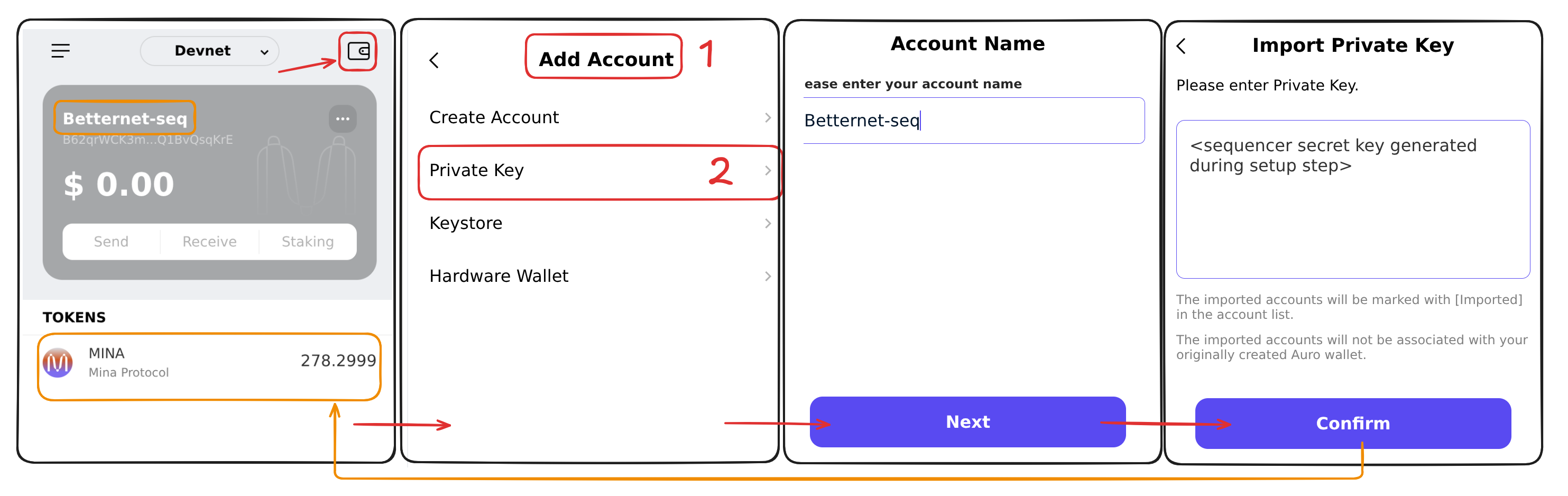
Add/select your newly deployed betternet network. 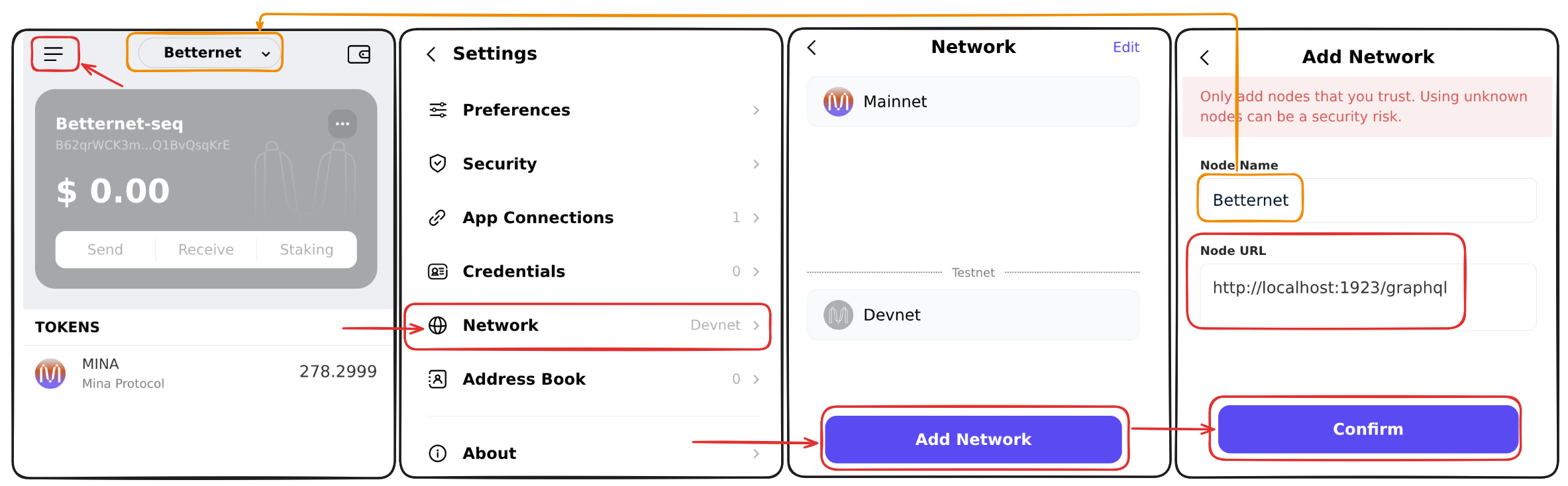
You can start sending transactions to your sequencer!
Troubleshooting
Check logs
docker compose logs -fStopping the Stack
docker compose downTo remove persistent data:
docker compose down -v