

Legacy: Running an Archive Node
Legacy deployment guide
This guide preserves archive setup for the older Mina-backed deployment. Zeko still uses Mina-derived archive schemas, but the Ethereum deployment requires its own endpoints and service configuration. Start with Ethereum Operator Getting Started.
This guide explains how to add the archive stack on top of an existing Zeko DA node so you can index and query historical data.
Note: This runbook uses a self-hosted DA node. However, you could also use a publicly available DA node.
Complete Running Zeko's DA Node first. This runbook assumes:
- your
da-layerservice is already running - your
docker-compose.yamlalready contains theda-layersetup from the DA node guide - your
da-layeris reachable in Docker Compose asda-layer:1924
Not covered in this guide:
- generating DA node keys
- exposing the archive services to the internet
- running
archive-node-apiitself
We will extend the same docker compose file you used for the DA node.
Prerequisites
System Requirements
- Linux or macOS (Windows WSL2 works too)
- enough disk space for PostgreSQL and archive history
Installed Software
Docker- a working DA node from Running Zeko's DA Node
Overview
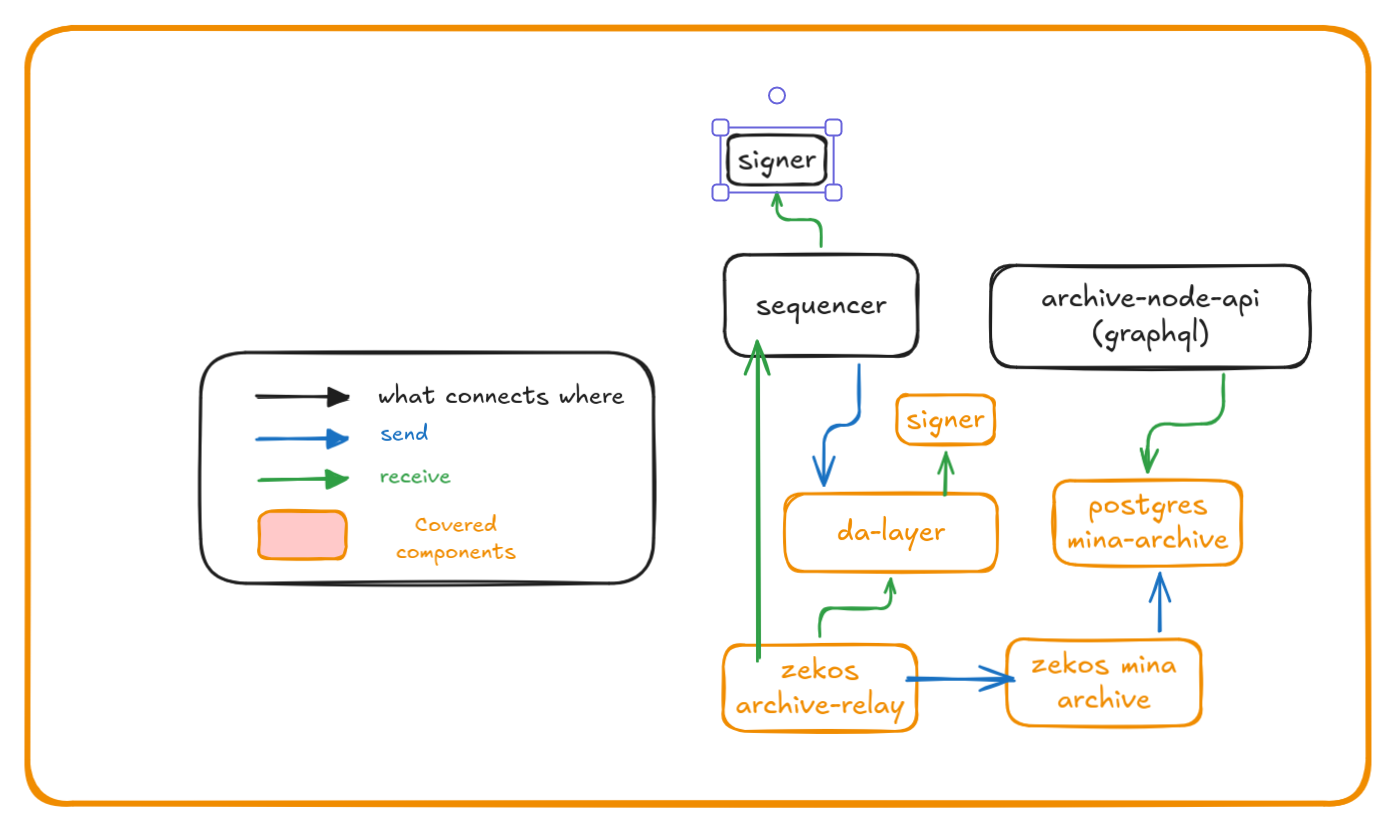
In the diagram above you see:
- Zeko's sequencer sending transactions to
da-layer - the optional archive stack that can index and serve historical data from your DA node
The archive stack adds the following services:
init-dbprepares the archive database schemapostgresstores indexed historyarchivewrites blocks into PostgreSQLarchive-relayreads from Zeko's sequencer and yourda-layer, then forwards data toarchive
Volumes/files
| Volumes | Files | Purpose |
|---|---|---|
initdb_data | Schema file(s) to bootstrap PostgreSQL | |
postgresql_data | Persistent storage for PostgreSQL | |
archive_data | Persistent storage for archive | |
archive-relay_data | Persistent storage for archive-relay | |
keys_data | da-layer-sk | Private key of the DA node |
keys_data | da-layer-pk | Public key of the DA node (used by sequencer) |
da-layer_data | Persistent storage for da-layer |
Service Overview
init-dbpostgresarchivearchive-relayinit-configda-layer
Ports Exposed
| Service | Port | Description |
|---|---|---|
| postgres | 5432 | Database |
Bootstrap process
Extend docker-compose.yaml with archive services
Copy
docker-compose.yamlto your project folder.Click to expand
docker-compose.yamlyamlservices: init-db: image: docker.io/zekolabs/zeko:latest container_name: init-db volumes: - initdb_data:/data/initdb entrypoint: - sh - -c command: > "curl -o /data/initdb/create_schema.sql 'https://raw.githubusercontent.com/zeko-labs/zeko/compatible/src/app/archive/create_schema.sql' && echo 'ALTER DATABASE archive OWNER TO archive;' > /data/initdb/init.sql && echo 'Archive database bootstrap complete' && exit 0" init-config: image: docker.io/zekolabs/zeko:latest container_name: init-config working_dir: /data volumes: - keys_data:/data/keys entrypoint: - sh - -c restart: "no" command: > "while [ ! -f /data/keys/.keys_created ]; do sleep 2; done; exit 0" postgres: depends_on: init-db: condition: service_completed_successfully image: postgres:16 container_name: postgres environment: POSTGRES_DB: archive POSTGRES_USER: archive POSTGRES_PASSWORD: archive volumes: - postgresql_data:/var/lib/postgresql/data - initdb_data:/docker-entrypoint-initdb.d ports: - "5432:5432" restart: unless-stopped da-layer: depends_on: init-config: condition: service_completed_successfully image: docker.io/zekolabs/zeko-da:latest container_name: da-layer ports: - "1924:1924" environment: ZEKO_SIGNATURE_KIND: "testnet" entrypoint: bash -c command: | "export MINA_PRIVATE_KEY=$(cat /keys/da-layer-sk) && \\ exec zeko-da \\ run-node \\ --port 1924 \\ --db-dir /data/db \\ --network-id testnet" volumes: - da-layer_data:/data - keys_data:/keys:ro restart: always archive: depends_on: postgres: condition: service_started image: zekolabs/zeko-archive-relay:latest container_name: archive entrypoint: bash -c command: | "exec zeko-archive run \\ --postgres-uri postgres://archive:archive@postgres:5432/archive" restart: always volumes: - archive_data:/data archive-relay: depends_on: archive: condition: service_started da-layer: condition: service_started image: zekolabs/zeko-archive-relay:latest container_name: archive-relay entrypoint: bash -c command: | "exec zeko-archive-relay \\ --zeko-uri \"https://testnet.zeko.io/graphql\" \\ --da-node da-layer:1924 \\ --network-id testnet \\ --db-dir /data \\ --sync-period 30 \\ --log-level Info \\ --archive-host archive \\ --archive-port 3086" volumes: - archive-relay_data:/data restart: always volumes: initdb_data: postgresql_data: archive_data: archive-relay_data: da-layer_data: keys_data:Start all services
bashdocker compose up -d
If all the steps were performed correctly you have the following:
da-layergetting data from Zeko's L2archive-relaypulling data fromda-layerand sending toarchivearchivestoring transactions inpostgresqlpostgrespersisting the indexed history
Synchronizing the data
Synchronizing will take a long time. At the time of writing Zeko L2 testnet has 1 million transactions and would take at least a week to get it synced.
Alternatively you can reach out to Zeko for the latest database or checkpoint archive that you can import in your setup and have a fully synced archive stack much faster.
Access your data
You can access the indexed data by running archive-node-api and configuring it to connect to your archive PostgreSQL database.